> For the complete documentation index, see [llms.txt](https://docs.degate.com/llms.txt). Markdown versions of documentation pages are available by appending `.md` to page URLs; this page is available as [Markdown](https://docs.degate.com/getting-started/create-a-wallet.md).
# Create a Wallet
Creating your DeGate account
The mobile app is the recommended path. Install it, then pick the way in that fits you.
[](https://apps.apple.com/app/apple-store/id6742168343?pt=127643354\&ct=docs\&mt=8) [](https://play.google.com/store/apps/details?id=com.app.degate\&referrer=utm_source%3Ddocs%26utm_medium%3Ddocs) [](https://download.degate.com/apps/degate-android.apk)
## Ways to add a wallet
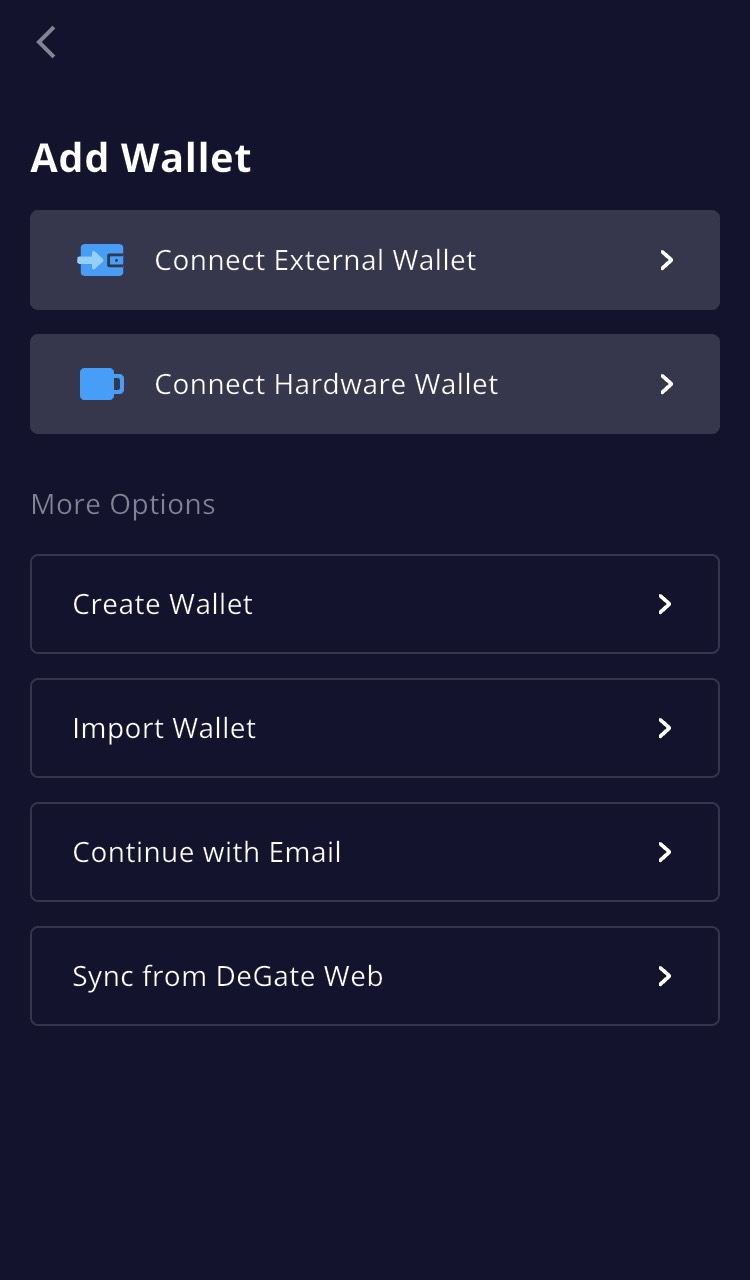
The **Add Wallet** screen offers six options:
* **Connect External Wallet:** sign in with a wallet you already have, via WalletConnect (up to 10 external wallet accounts).
* **Connect Hardware Wallet:** OneKey is supported via Bluetooth; hardware accounts currently cover Receive, same-chain Send, and Turbo Range. See the FAQ below.
* **Create Wallet:** generate a new wallet with a 12-word recovery phrase, created locally on your device. Write the phrase down and store it offline.
* **Import Wallet:** bring an existing 12-word recovery phrase.
* **Continue with Email:** the fastest start if you are new to crypto. Enter your email, confirm the code from your inbox, and set a password.
* **Sync from DeGate Web:** bring an account you use on the DeGate web app into the app.
{% hint style="info" %}
For higher-value assets, we recommend **Create Wallet** or **Import Wallet** (or connecting a hardware wallet), so that you hold the recovery phrase yourself.
{% endhint %}
## Create a wallet via the web app
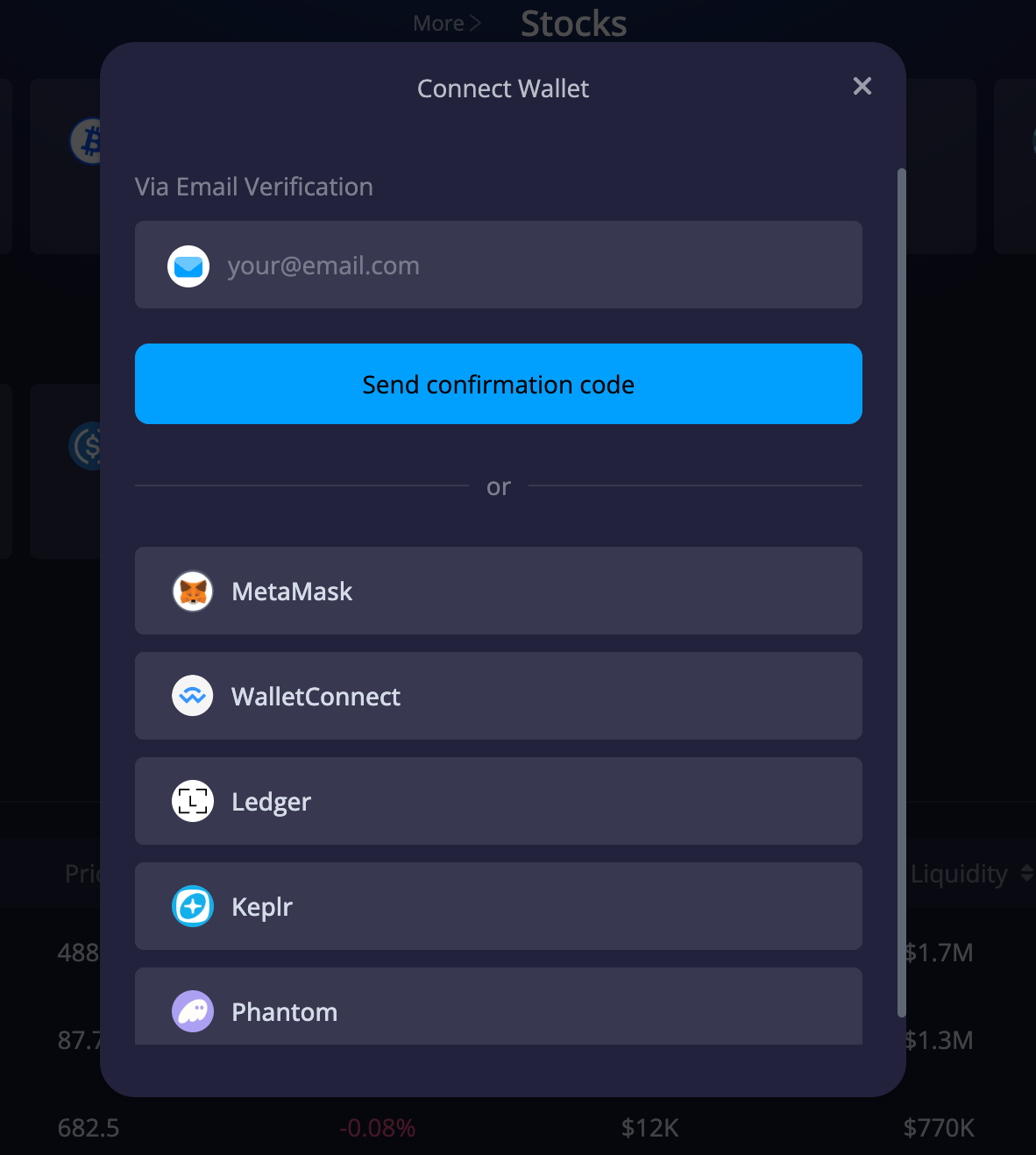
Visit [app.degate.com](https://app.degate.com) and click **Connect Wallet**, then choose your preferred method. Email login works here too: the same email wallet can be used in the app and the web app.
## FAQ
**Do I need a separate wallet for each chain?** No. One DeGate wallet gives you addresses across supported chains, generated as you enable each chain and controlled by your keys. See [Wallet Addresses & Networks](/security-and-self-custody/wallet-address-and-networks.md).
**Who holds the keys of the wallet I just created?** You do. DeGate cannot access your private keys regardless of which creation method you choose. See [Security Overview](/security-and-self-custody/security-overview.md).
**Does creating a wallet require identity verification?** No. DeGate is a key-management app, not an account service: there is no registration and no onboarding flow. Feature availability may vary by jurisdiction, and users are responsible for compliance with applicable local laws.
**Can I use a hardware wallet?** Yes, partially. OneKey (via Bluetooth) is supported today; hardware-wallet accounts currently cover Receive, same-chain Send, and Turbo Range, and do not yet cover Bitcoin. The web app ([app.degate.com](https://app.degate.com)) also supports hardware wallet connections. One difference from other account types: hardware wallet accounts pay network gas from their own address in the chain's native token — keep a small balance there (for example, ETH on Base) for sends and Turbo Range operations.
---
# Agent Instructions
This documentation is published with GitBook. GitBook is the documentation platform designed so that both humans and AI agents can read, navigate, and reason over technical content effectively. Learn more at gitbook.com.
## Querying This Documentation
If you need additional information that is not directly available in this page, you can query the documentation by asking a question.
Perform an HTTP GET request on the following URL with the `ask` and `goal` query parameters:
```
GET https://docs.degate.com/getting-started/create-a-wallet.md?ask=&goal=
```
`ask` is the immediate question: it should be specific, self-contained, and written in natural language.
`goal` is what the user is ultimately trying to achieve, the reason they need the answer. Sharing it helps GitBook give you a better, more relevant answer. A goal is most helpful when it describes the outcome the user wants rather than restating the question. For example, with `ask=how do I create an API token`, a goal like `automate deployments from our CI pipeline` lets GitBook tailor the answer to that use case.
The response will contain a direct answer to the question and relevant excerpts and sources from the documentation.
Use this mechanism when the answer is not explicitly present in the current page, you need clarification or additional context, or you want to retrieve related documentation sections.
 * **Connect External Wallet:** sign in with a wallet you already have, via WalletConnect (up to 10 external wallet accounts).
* **Connect Hardware Wallet:** OneKey is supported via Bluetooth; hardware accounts currently cover Receive, same-chain Send, and Turbo Range. See the FAQ below.
* **Create Wallet:** generate a new wallet with a 12-word recovery phrase, created locally on your device. Write the phrase down and store it offline.
* **Import Wallet:** bring an existing 12-word recovery phrase.
* **Continue with Email:** the fastest start if you are new to crypto. Enter your email, confirm the code from your inbox, and set a password.
* **Sync from DeGate Web:** bring an account you use on the DeGate web app into the app.
{% hint style="info" %}
For higher-value assets, we recommend **Create Wallet** or **Import Wallet** (or connecting a hardware wallet), so that you hold the recovery phrase yourself.
{% endhint %}
## Create a wallet via the web app
Visit [app.degate.com](https://app.degate.com) and click **Connect Wallet**, then choose your preferred method. Email login works here too: the same email wallet can be used in the app and the web app.
* **Connect External Wallet:** sign in with a wallet you already have, via WalletConnect (up to 10 external wallet accounts).
* **Connect Hardware Wallet:** OneKey is supported via Bluetooth; hardware accounts currently cover Receive, same-chain Send, and Turbo Range. See the FAQ below.
* **Create Wallet:** generate a new wallet with a 12-word recovery phrase, created locally on your device. Write the phrase down and store it offline.
* **Import Wallet:** bring an existing 12-word recovery phrase.
* **Continue with Email:** the fastest start if you are new to crypto. Enter your email, confirm the code from your inbox, and set a password.
* **Sync from DeGate Web:** bring an account you use on the DeGate web app into the app.
{% hint style="info" %}
For higher-value assets, we recommend **Create Wallet** or **Import Wallet** (or connecting a hardware wallet), so that you hold the recovery phrase yourself.
{% endhint %}
## Create a wallet via the web app
Visit [app.degate.com](https://app.degate.com) and click **Connect Wallet**, then choose your preferred method. Email login works here too: the same email wallet can be used in the app and the web app.